Next.js Authentication with an External Backend (JWT)
Introduction
Section titled “Introduction”Usually when you build a new project from scratch with Next.js you don’t create a separate backend
because it adds more complexity and slow you down, especially for MVPs!
We mostly go with solutions that don’t let us worry or deeply invest in authentication like third party services such as Clerk, a BaaS like Supabase or even Better Auth, so we have auth ready in seconds and we can ship fast.
But what about when we are required to work with an existing backend, no matter what technology it’s built with? And this also is a pattern called BFF(backend for frontend).
If you don’t know how to implement it, this means that you don’t understand the authentication flow quite yet! But don’t worry we’ll explain it briefly before jumping to the samples.
Authentication Flow
Section titled “Authentication Flow”When we hit the login endpoint with the correct credentials, we get a response object that includes two important properties:
accessToken: Sent with every request to endpoints that require authentication viaHeaders; it usually expires in one hour.refreshToken: Needed for the refresh endpoint to obtain a newaccessTokenwhen the current one expires.
And now the auth process proceeds with the following steps:
1. Save the token
Section titled “1. Save the token”After receiving the access token and refresh token, they should be stored securely. Common options include in-memory (client), secure storage (mobile), or cookies (our case).
We must use HttpOnly cookies which cannot be accessed via JavaScript (document.cookie),
helping protect our app from various client side threats, including
XSS attacks.
"use server";
import { cookies } from "next/headers";
export async function login(req) {  /// ....
  const cookieStore = await cookies();
  cookieStore.set({    name: "access_token",    value: accessToken,    httpOnly: true,    secure: true,    sameSite: "strict",    path: "/",    maxAge: 60 * 60, // 1 hour  });
  cookieStore.set({    name: "refresh_token",    value: refreshToken,    httpOnly: true,    secure: true,    sameSite: "strict",    path: "/",    maxAge: 7 * 24 * 60 * 60, // 7 days  });
  return new Response(null, { status: 200 });}
2. Use the token
Section titled “2. Use the token”Now on every request, we read the accessToken and we inject it in the Headers for all
authenticated endpoints.
fetch("/api/user", { headers: { Authorization: `Bearer ${accessToken}`, },});Of course, we won’t do that manually on every request; we handle it once via Interceptors, which is even easier with a package like Axios.
async function fetchWithAuth(url, options = {}) {  // getAccessToken() reads the token depending on the framework, e.g. in Next.js:  //const cookieStore = await cookies()  //let token = cookieStore.get('access_token')?.value  let token = getAccessToken();  let headers = { ...options.headers, Authorization: `Bearer ${token}` };
  let response = await fetch(url, { ...options, headers });
  if (response.status === 401) {    token = await refreshAccessToken(); // refresh token logic    if (!token) return response; // failed refresh
    headers = { ...options.headers, Authorization: `Bearer ${token}` };    response = await fetch(url, { ...options, headers });  }
  return response;}
As you can see from the snippet above, we also handle status 401, which means the user is not
authorized or the access token is expired, so we attempt to generate a new one.
Here is a recap of the scenario with this diagram below:
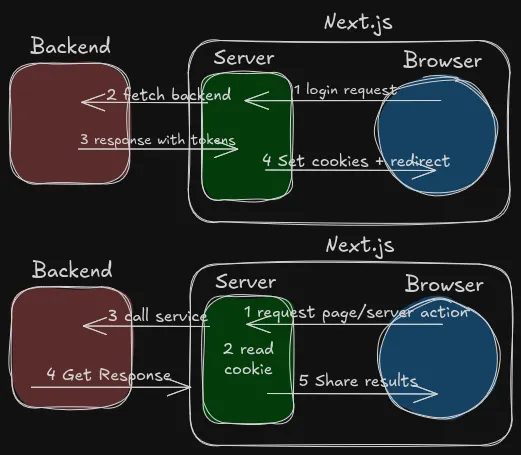
Next JS Implementation
Section titled “Next JS Implementation”Now that we have the core idea we can start setup auth with Next.js app. For this example we gonna use this fake API for the testing.
After we create a Next.js project we create login page + login server action.
import { loginAction } from "./actions/login"
export default function LoginPage() {  return (    <div className="min-h-screen flex items-center justify-center bg-gray-100">      <form        action={loginAction}        method="POST"        className="flex flex-col items-center gap-4 bg-white shadow-md rounded-2xl p-10 w-96"      >        <h1 className="text-2xl font-semibold text-gray-800 mb-2">Sign in</h1>
        <input          type="email"          name="email"          placeholder="Email"          className="w-full border border-gray-200 rounded-lg px-4 py-2.5 text-sm text-gray-700 focus:outline-none focus:ring-2 focus:ring-black"          defaultValue="john@mail.com"        />        <input          type="password"          name="password"          placeholder="Password"          className="w-full border border-gray-200 rounded-lg px-4 py-2.5 text-sm text-gray-700 focus:outline-none focus:ring-2 focus:ring-black"          defaultValue="changeme"        />
<button type="submit" className="mt-2 w-full bg-black text-white text-sm font-medium py-2.5 rounded-lg hover:bg-gray-800 transition-colors" > Sign in </button> </form> </div> )}"use server";
import { cookies } from "next/headers";import { redirect } from "next/navigation";
export async function loginAction(formData: FormData) { const email = formData.get("email") as string; const password = formData.get("password") as string;
const res = await fetch("https://api.escuelajs.co/api/v1/auth/login", { method: "POST", headers: { "Content-Type": "application/json" }, body: JSON.stringify({ email, password }), });
if (!res.ok) { redirect("/login?error=wrong_credentials"); }
const { access_token, refresh_token } = await res.json();
const cookieStore = await cookies(); cookieStore.set({ name: "access_token", value: access_token, httpOnly: true, secure: true, sameSite: "strict", path: "/", maxAge: 60 * 60, // 1 hour });
cookieStore.set({ name: "refresh_token", value: refresh_token, httpOnly: true, secure: true, sameSite: "strict", path: "/", maxAge: 7 * 24 * 60 * 60, // 7 days });
redirect("/dashboard");}Now we have to protect private pages by checking the cookie, but instead of doing this on every page, we only going to do it once via the middleware + layout.
// proxy.ts -> Next js 16+ middlewareimport { NextRequest, NextResponse } from "next/server";
const PROTECTED = ["/dashboard"];// const PUBLIC = ["/login"]
export function proxy(req: NextRequest) {  const { pathname } = req.nextUrl;  const token = req.cookies.get("access_token")?.value;
  const isProtected = PROTECTED.some((p) => pathname.startsWith(p));  const isPublic = pathname === "/";  // const isPublic = PUBLIC.some((p) => pathname.startsWith(p))
  if (isProtected && !token) {    return NextResponse.redirect(new URL("/", req.url));    // return NextResponse.redirect(new URL('/login', req.url))  }
  if (isPublic && token) {    return NextResponse.redirect(new URL("/dashboard", req.url));  }
  return NextResponse.next();}
export const config = { matcher: ["/dashboard/:path*", "/"],};import { cookies } from "next/headers";import { redirect } from "next/navigation";
import { logoutAction } from "../actions/logout";
async function getProfile() { const cookieStore = await cookies(); const accessToken = cookieStore.get("access_token")?.value;
if (!accessToken) { redirect("/"); }
const res = await fetch("https://api.escuelajs.co/api/v1/auth/profile", { cache: "no-store", headers: { Authorization: `Bearer ${accessToken}`, }, });
if (res.status === 401) { const store = await cookies(); store.delete("access_token"); store.delete("refresh_token"); redirect("/"); }
if (!res.ok) { throw new Error("Failed to fetch profile"); }
return res.json();}
export default async function DashboardPage() { const profile = await getProfile();
return ( <div className="min-h-screen bg-gray-100 p-8"> <div className="mb-4 flex items-center justify-between"> <h1 className="text-2xl font-semibold text-gray-800">Dashboard</h1> <form action={logoutAction}> <button type="submit" className="rounded-lg bg-red-500 px-4 py-2 text-white transition-colors hover:bg-red-600" > Logout </button> </form> </div> <pre className="overflow-auto rounded-2xl bg-white p-6 text-sm text-gray-700 shadow-md"> {JSON.stringify(profile, null, 2)} </pre> </div> );}Conclusion
Section titled “Conclusion”We can wrap this up with the core points:
- Store your tokens in HttpOnly cookies
- Inject them via an interceptor so you don’t repeat the check on every server action
- Guard your routes with middleware
proxy.ts - Guard each page as second security layer in case middleware fails (and remember to do it once via
layout.tsx)
For a minimal working example, check this repo repo
git clone https://github.com/zougari47/blog.gitcd bloggit checkout dada8aa